
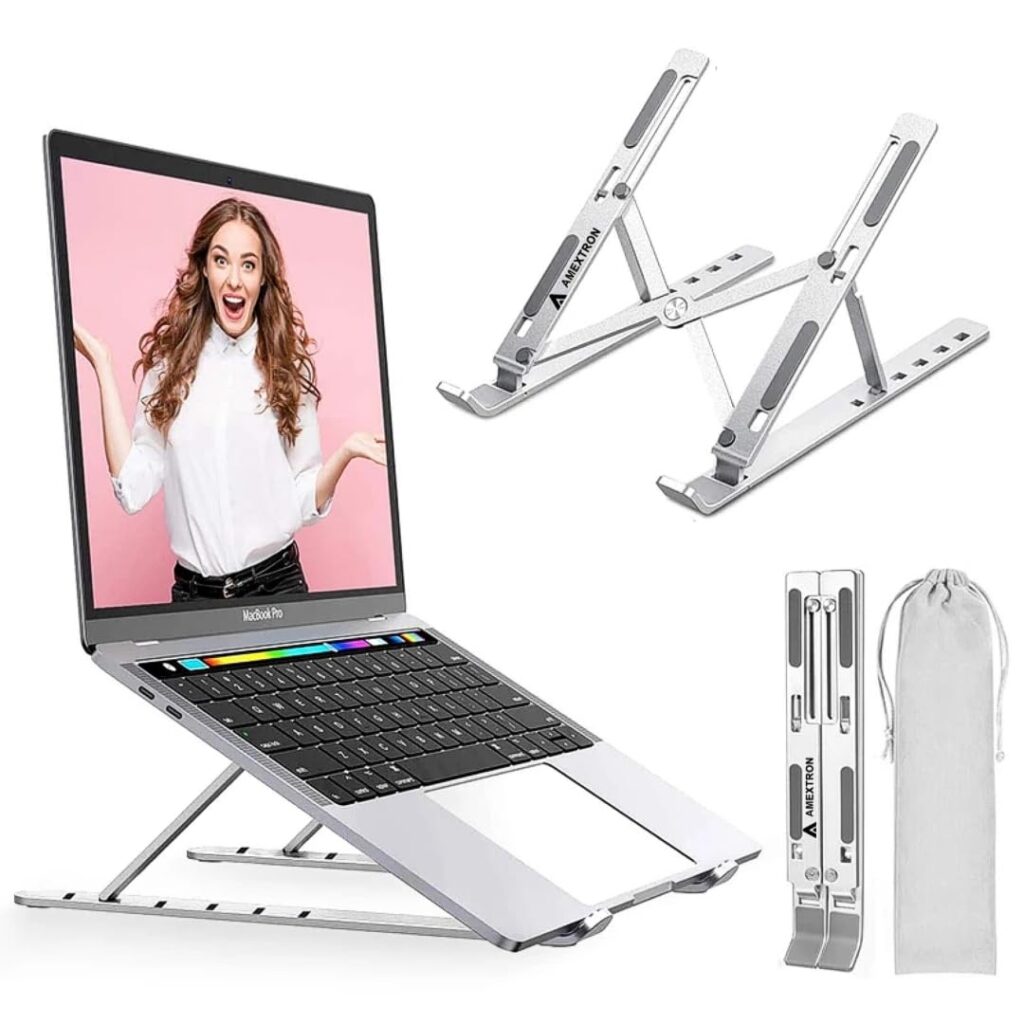
laptop Stand

Boost Productivity and Comfort with the Right Laptop Stand – Expert Tips

7:30 AM

In today’s fast-paced work environment, maximizing productivity is crucial, and a key element in achieving this is the right workspace setup. One often-overlooked component that can significantly impact your productivity is your laptop stand. A well-chosen stand can enhance ergonomics, improve comfort, and reduce strain, ultimately leading to better focus and efficiency. Here’s a guide on what to look for when choosing a laptop stand to boost your productivity. what to look for? Lorem ipsum dolor sit amet, consectetur adipiscing elit. Ut elit tellus, luctus nec ullamcorper mattis, pulvinar dapibus leo. 1. Ergonomic Design The primary function of a laptop stand is to improve ergonomics. Look for a stand that allows you to adjust the height and angle of your laptop. Ideally, your screen should be at eye level, which helps prevent neck and back strain. An adjustable stand can accommodate various sitting positions and desk setups, ensuring that you maintain a comfortable and healthy posture throughout the day. 2. Stability and Durability A stable laptop stand ensures that your device remains secure, preventing accidental slips or wobbles. Opt for stands made from durable materials such as metal or high-quality plastic, which offer robust support. Some stands also feature anti-slip pads or grips to further enhance stability, keeping your laptop firmly in place during use. 3. Portability and Design If you frequently move between different workspaces, portability is key. Consider a lightweight and foldable stand that’s easy to transport. Additionally, the design of the stand should complement your workspace aesthetic. Choose a stand that not only supports your laptop effectively but also blends seamlessly with your desk setup. 4. Cooling Features Overheating can be a concern with prolonged laptop use. Some laptop stands come with built-in cooling features, such as ventilation holes or fans, which help keep your device cool and functioning efficiently. This can prevent performance issues and extend the lifespan of your laptop.   5. Additional Features Think about any extra features that might enhance your productivity. For example, some stands include cable management systems to keep your workspace tidy, or additional storage for office supplies. Others may offer integrated docking stations or ports for better connectivity and convenience. 6. Adjustability and Flexibility A stand that offers multiple adjustment options provides flexibility for various tasks. Whether you’re typing, drawing, or watching videos, being able to modify the stand’s height and angle will allow you to find the most comfortable and productive position. 7. Ease of Assembly Finally, consider how easy the stand is to assemble and disassemble. A stand that’s straightforward to set up will save you time and effort, especially if you need to adjust it frequently or transport it between locations. Conclusion Choosing the right laptop stand can have a profound impact on your productivity and overall well-being. By focusing on ergonomic design, stability, portability, cooling features, and additional functionalities, you can find a stand that enhances your comfort and efficiency. Invest in a quality laptop stand today and transform your workspace into a productivity powerhouse.      

Mobile Stand

Top Features to Look for in a Quality Mobile Stand

7:30 AM

The Guide to Choosing the Perfect Mobile Stand  In a world where our mobile devices are constantly at our fingertips, having the right mobile stand can make a world of difference. Whether you’re working from home, enjoying a video call, or navigating while driving, the right stand not only enhances your comfort but also boosts your productivity. In this guide, we’ll explore the benefits of mobile stands, how to choose the perfect one for your needs, and highlight some top options available today. Why You Need a Mobile Stand 1.Ergonomics and Comfort:  Using a mobile device without a stand can lead to poor posture and discomfort. A mobile stand helps elevate your device to eye level, reducing neck strain and improving your overall posture. This is especially beneficial if you’re spending long hours on video calls or working on your mobile device. 2.Hands-Free Convenience:  Imagine being able to watch your favorite videos or follow a recipe while keeping your hands free. A mobile stand holds your device in place, allowing you to multitask more efficiently. It’s also perfect for following video tutorials or participating in video conferences. 3.Enhanced Viewing Angles:  Many mobile stands offer adjustable angles, allowing you to find the perfect viewing position. This flexibility can improve your viewing experience, whether you’re reading, watching videos, or using your device for presentations. 4.Cable Management : Some stands come with built-in cable management features, such as grooves or clips, to keep your charging cable neatly organized. This is especially useful for desktop or charging stands. 5.Ease of Use : The stand should be easy to set up and adjust. Look for stands with simple, user-friendly designs that don’t require complicated assembly or adjustments. 6.Aesthetic Appeal : The design and color of the stand should complement your workspace or home decor. Whether you prefer a sleek, modern look or a rustic wooden finish, there are plenty of options to suit your style.   Top Mobile Stands to Consider The Adjustable Desktop Stand:  Ideal for office use, this stand features multiple adjustment points, allowing you to customize the height and angle of your device. It’s perfect for creating an ergonomic workspace and can support a range of devices. 2.The Portable Foldable Stand:  If you’re frequently on the move, this lightweight and compact stand is a great choice. It folds easily for convenient transport and provides stable support for your device wherever you go. 3.The Car Mount Stand:  Designed for in-car use, this stand securely attaches to your dashboard or windshield, providing hands-free navigation and calls. It’s an essential accessory for anyone who spends a lot of time driving. 4.The Multi-Device Stand:  For those who use multiple devices, this stand accommodates several gadgets simultaneously. It’s perfect for managing your phone, tablet, and other devices in one convenient location Key Features to Look For When choosing a mobile stand, consider the following key features to ensure it meets your needs: AdjustabilityLook for stands that offer adjustable height, tilt, and rotation. This allows you to set your phone at the perfect angle for different activities, reducing strain on your eyes and neck. StabilityA good stand should have a stable base that prevents your phone from tipping over. Non-slip pads on the base and phone holder can add extra stability, especially on smooth surfaces. CompatibilityEnsure the stand is compatible with your phone’s size and weight. Some stands are designed to hold specific devices, while others can accommodate a wide range of phone models. PortabilityIf you need a stand for travel or on-the-go use, choose a compact and lightweight design that’s easy to carry. Foldable stands are particularly useful for this purpose. Special Considerations for Specific Uses Depending on how you plan to use your mobile stand, you may need to consider additional factors: Use Cases for Mobile Stands Mobile stands are versatile and can be used in various scenarios. Here are some common use cases: 1.Work and Study Enhance your work-from-home or study setup by positioning your phone at the perfect angle for video calls, reading documents, or taking notes. Benefits: Improved ergonomics, better multi-tasking. Recommendation: Adjustable desktop stands or clamp stands for flexibility. 2.Entertainment Whether you’re binge-watching shows, playing games, or video chatting with friends, a mobile stand provides hands-free convenience. Benefits: Comfortable viewing angles, stable support. Recommendation: Desktop stands with adjustable angles or foldable stands for portability. 3. Cooking Keep your phone handy in the kitchen while following a recipe without worrying about spills or accidents. Benefits: Safe and stable platform for your device. Recommendation: Stands with non-slip features or clamp stands for easy attachment to kitchen counters. 4. Fitness and Workouts Mobile stands are great for positioning your device at the perfect height for workout videos, yoga sessions, or virtual classes. Benefits: Allows you to maintain form without constantly adjusting your phone. Recommendation: Floor stands or adjustable clamp stands. 5.Travel and Commute Stay connected and entertained during your travels with portable mobile stands. Benefits: Easy to carry, quick setup. Recommendation: Foldable stands or car mounts Ergonomic Benefits of Using a Mobile Stand Using a mobile stand can greatly improve your ergonomics, especially during prolonged use. Here are some ergonomic benefits: Improved Posture: Adjusting your phone to eye level reduces neck strain and encourages a healthier sitting position. Reduced Eye Strain: Keeping your phone at the correct distance and angle helps reduce eye strain during extended use. Minimized Wrist and Hand Fatigue: Hands-free usage means less strain on your wrists and fingers. Conclusion Choosing the right mobile stand can significantly enhance your mobile device experience, providing comfort, convenience, and improved functionality. By considering your device type, usage needs, and budget, you can find the perfect stand that suits your lifestyle.Whether you’re working, studying, or simply enjoying some downtime, the right mobile stand enhances your experience by providing the support, stability, and ergonomic benefits that keep your device securely in place. Invest in a quality mobile stand today, and enjoy the convenience of hands-free usage with every call, video, or task. Explore our collection of mobile stands today and discover how a simple accessory can transform your mobile interactions. Ready